Visualization Guide
MahJax exposes two main helpers for SVG output:
save_svg(...)save_svg_animation(...)
If you were looking for save_animation, the current public function name is save_svg_animation.
Both helpers accept tile_style:
tile_style="standard": default riichi mahjong tilestile_style="bilingual": tiles with English-friendly labels for non-kanji readers
1. Save a single SVG
The quickest path is:
- create an environment
- initialize a state
- call
mahjax.save_svg(...)
Standard tiles
import jax
import mahjax

env = mahjax.make("no_red_mahjong")
state = env.init(jax.random.PRNGKey(0))

mahjax.save_svg(state, "round-standard.svg")
Bilingual tiles
import jax
import mahjax

env = mahjax.make("no_red_mahjong")
state = env.init(jax.random.PRNGKey(0))

mahjax.save_svg(state, "round-bilingual.svg", tile_style="bilingual")
The default is tile_style="standard", so you only need to pass tile_style when you want the bilingual tile set.
2. Save an SVG animation
save_svg_animation(...) takes a list of states.
The simplest way to build that list is to run the environment step by step and append every intermediate state.
Standard tiles
import jax
import jax.numpy as jnp
import mahjax

env = mahjax.make("no_red_mahjong")
rng = jax.random.PRNGKey(0)
state = env.init(rng)
history = [state]

for _ in range(40):
    if bool(state.terminated | state.truncated):
        break
    action = jnp.argmax(state.legal_action_mask).astype(jnp.int32)
    rng, step_key = jax.random.split(rng)
    state = env.step(state, action, step_key)
    history.append(state)

mahjax.save_svg_animation(
    history,
    "round-standard-animation.svg",
    frame_duration_seconds=0.4,
)
Bilingual tiles
import jax
import jax.numpy as jnp
import mahjax

env = mahjax.make("no_red_mahjong")
rng = jax.random.PRNGKey(0)
state = env.init(rng)
history = [state]

for _ in range(40):
    if bool(state.terminated | state.truncated):
        break
    action = jnp.argmax(state.legal_action_mask).astype(jnp.int32)
    rng, step_key = jax.random.split(rng)
    state = env.step(state, action, step_key)
    history.append(state)

mahjax.save_svg_animation(
    history,
    "round-bilingual-animation.svg",
    frame_duration_seconds=0.4,
    tile_style="bilingual",
)
3. Hide opponent hands
save_svg(...) and save_svg_animation(...) accept show_all_hands and visible_player.
With show_all_hands=False, every player other than visible_player is drawn face-down (back.svg). Melds, river, dora and other public information are still shown.
mahjax.save_svg(
    state,
    "round-bilingual.svg",
    tile_style="bilingual",
    show_all_hands=False,
    visible_player=0,
)
The default is show_all_hands=True (all hands revealed).
4. Using the state method directly
For notebooks and quick experiments, the State object also exposes SVG helpers:
This is convenient when you already have a state in memory and do not need the top-level helper.
5. Visualization examples
MahJax already includes sample animations in both tile styles.
| Standard tiles | Bilingual tiles |
|---|---|
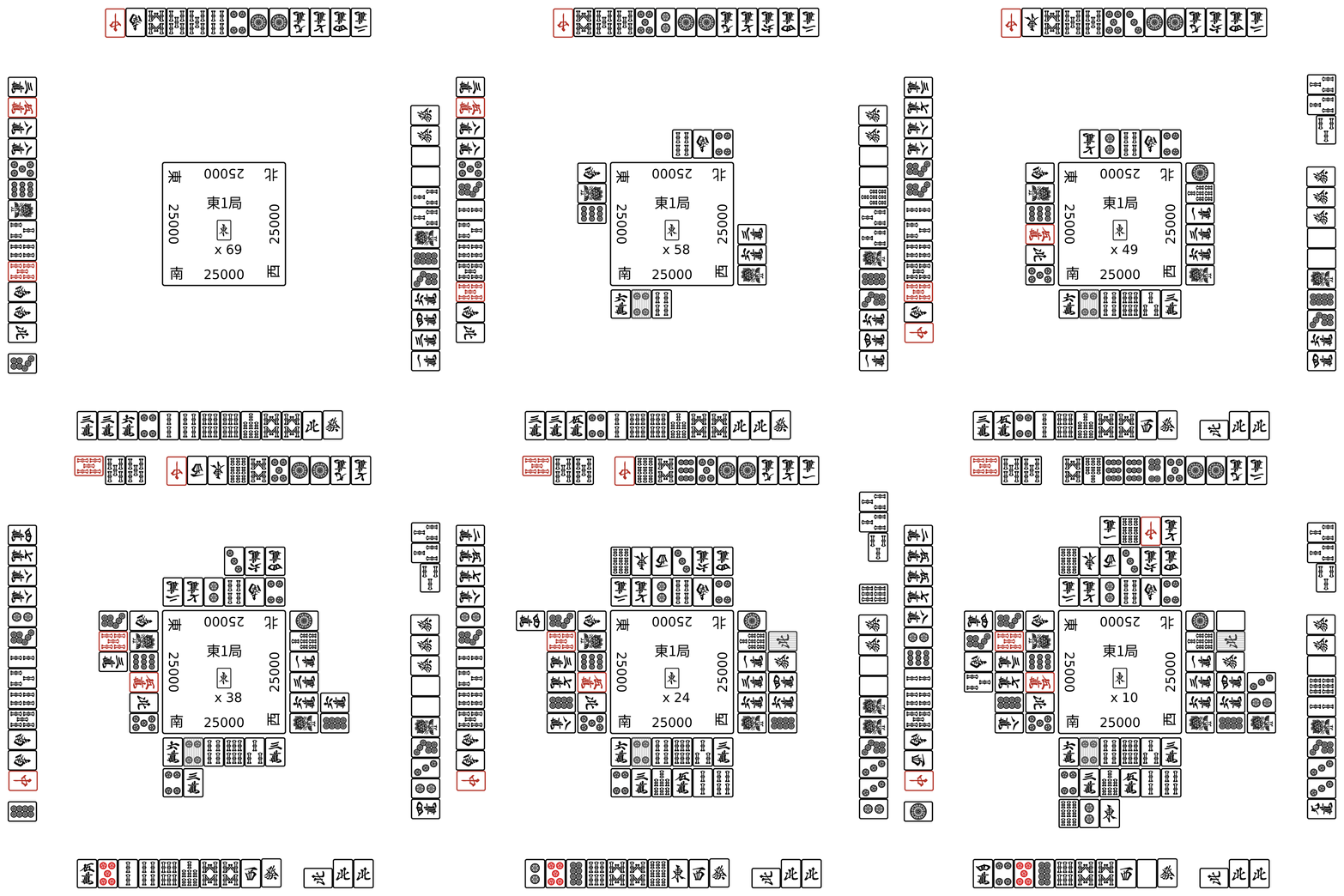 |
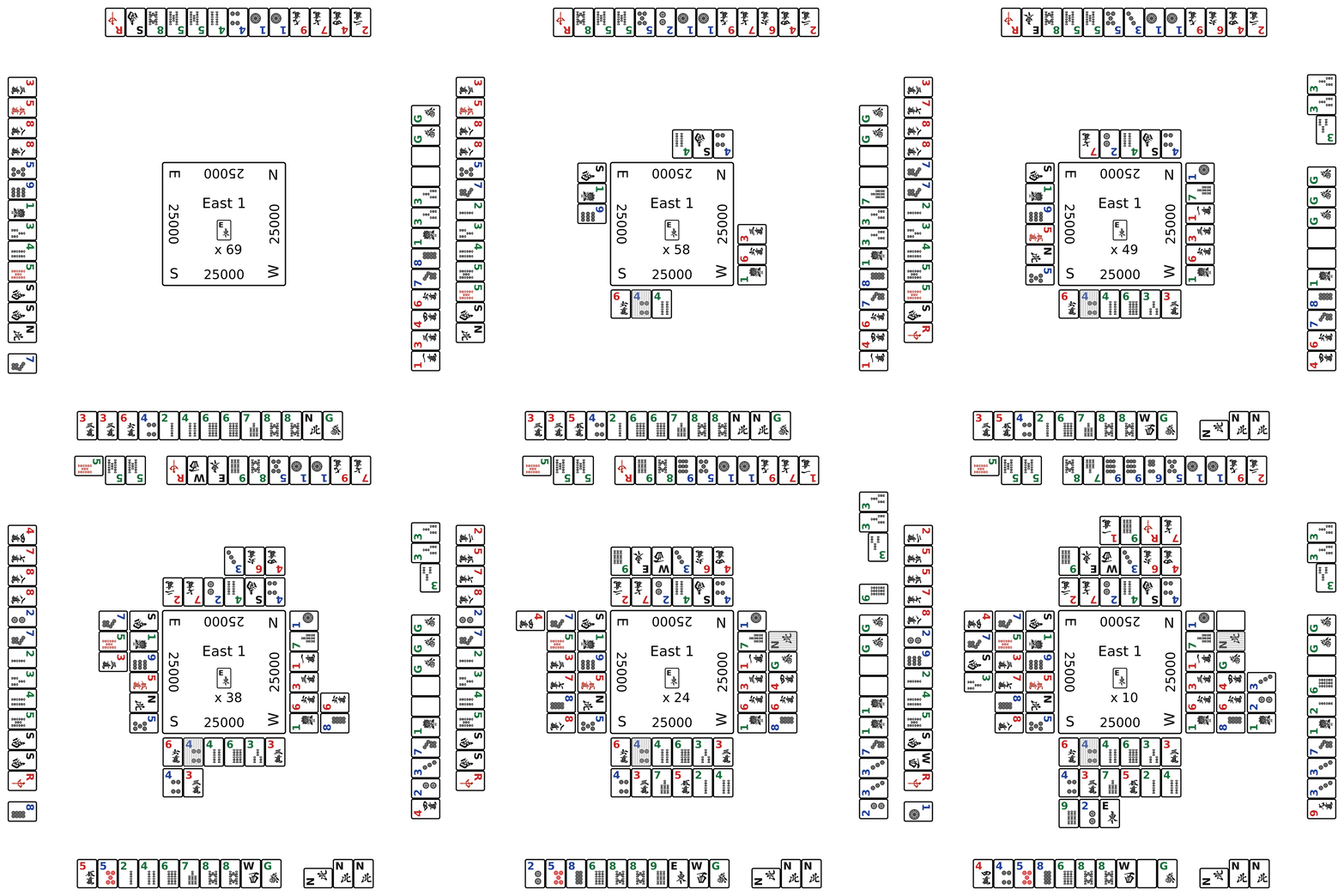 |
These examples are useful when you want to:
- show the same round state to Japanese and non-Japanese readers
- prepare documentation for users who do not know the kanji tile faces
- compare how readable your examples are with
standardandbilingualtiles
6. Practical notes
- The output of
save_svg_animation(...)is an animated SVG, not a GIF or MP4. - The same visualization API works for both
no_red_mahjongandred_mahjong. frame_duration_secondscontrols playback speed.- For riichi mahjong in MahJax,
tile_style="bilingual"is the switch you want for non-kanji readers.
For a beginner-facing explanation of the tile set itself, see Mahjong Basics.